
How Can a Virtual Assistant for the Holidays Reduce Operational Overload?




How can a virtual assistant for the holidays help your business and you? Virtual assistants (VAs can do a plethora of tasks that keep your business on track and alleviate your workload as a business owner or manager. Because, honestly, regardless of how business-focused you are, there’s a person behind it. And that person needs and deserves to have work-life balance. To protect your well-being in order to have some family time, focus on your personal development, and, yes, on your core business goals too. And you need time for that, something that holiday overload steals from you. Being more specific, for instance, a VA can help with customer service, lead follow-up, and handle administrative work when demand grows and employees take time off. They can even help you with personal errands like finding gifts, ordering them online, or coordinating catering services for family or work events.
Start defining the coverage you need: the tasks that can’t be postponed, who’ll handle them, and when your help will be available. Start with a coverage plan: which tasks must continue, who handles them, and when help is available. Once you hire a virtual assistant for the holidays, they will work within your rules and agreed authority. Beyond those limits, you’ll retain strategic decisions and approvals.
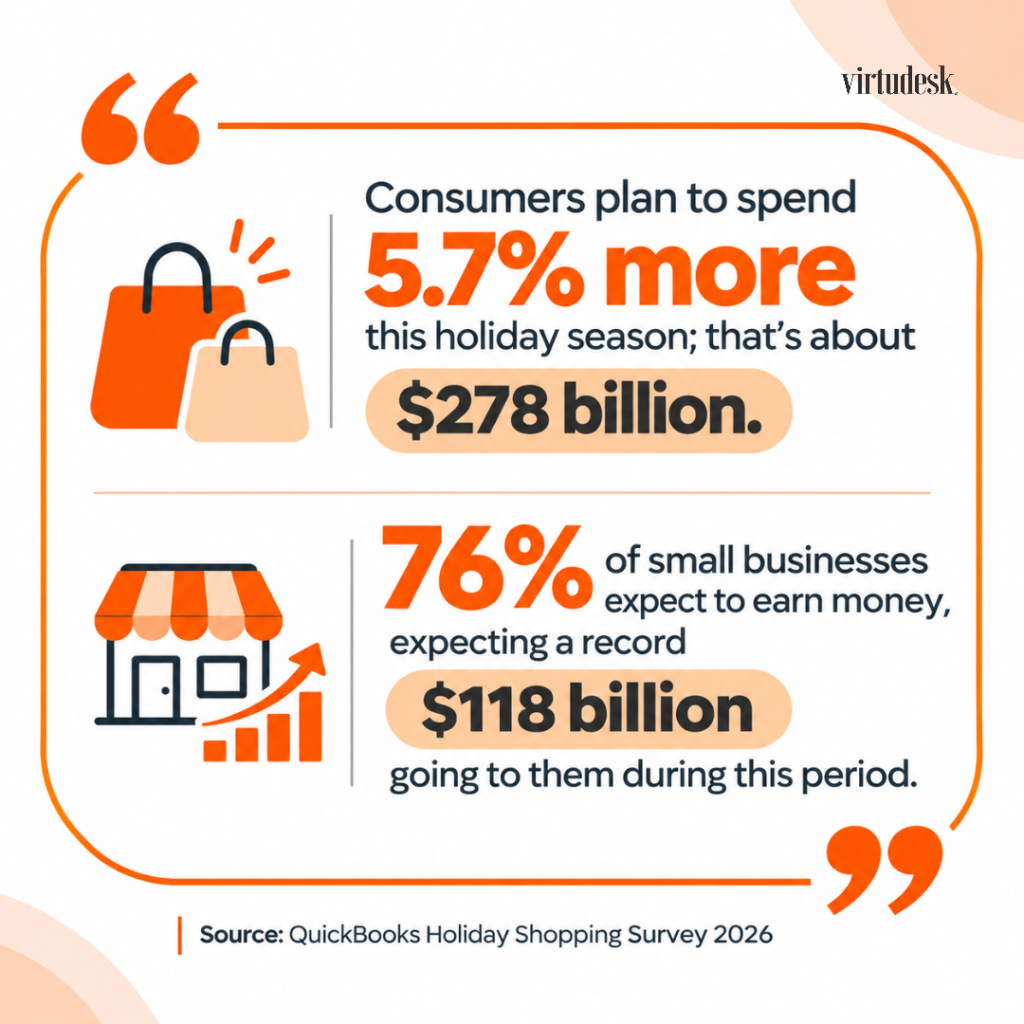
Holiday pressure comes because customer demand rises just as employees take time off. For the 2026 season, the National Retail Federation (NRF) forecast that November and December retail sales would grow 4.2% over 2025, reaching $1.013 trillion. The positive predictions apply to small businesses too. QuickBooks Holiday Shopping Survey 2026 uncovered that consumers plan to spend 5.7% more this holiday season; that’s about $278 billion. 76% of small businesses expect to earn more money, expecting a record $118 billion going to them during this period.
You need to be prepared for such an upsurge in sales. Not only do you need to face the demand, but also consider that the year-end arrives, bringing its paperwork, reports, records, and unfinished leads.
Not every business sells goods or gifts, of course. The holiday season also increases the demand for services, including professional ones. A law firm or a real estate team may simply have fewer working days and more clients trying to finish before the year closes.
Today, we propose that you build that plan from Thanksgiving through January. Use it to identify gaps, prepare handoffs, and decide which work needs attention now and which can wait until your team returns. In this guide, we’ll help you with that.
Key Takeaways
- The holiday season has more than one peak: Thanksgiving week, the Christmas run-up, and the year-end close. Each can strain a different part of your business.
- Some tasks are easier to finish before demand rises, such as customer relationship management (CRM) cleanup, holiday campaign scheduling, and written workflows.
- Holiday customer service needs coverage as well as capacity. Define who answers, which hours it will cover, and what happens outside them.
- Confirm holiday dates, working hours, and a backup contact before promising customers coverage.
- Businesses need a plan for the week between Christmas and New Year’s. Some close, others work partially, others need to keep operating full-time. Depending on your business, think of including posted hours, away messages, and a contact for urgent issues.
- For year-end records, reports, and open leads to move faster, someone should already own them before January starts.
- To improve your holiday VAs' support and performance, give them ranked priorities, documented processes, and written escalation rules. Regular check-ins are important too.
Where Will Your Holiday Coverage Plan Have Gaps?
To identify the gap a virtual assistant for the holidays could fill, compare the expected work with your team’s available hours. Look at each peak separately.
Which holiday periods will affect your business most?
Depends on your industry. An online store may feel pressure around Thanksgiving, an event venue’s rental around year-end, and a consulting firm may face year-end deadlines.
Adobe forecasts $47.5 billion in US online sales during Cyber Week 2026, with Cyber Monday remaining the biggest online shopping day of the season and Black Friday experiencing stronger growth.
Map the periods that affect your own business and industry:
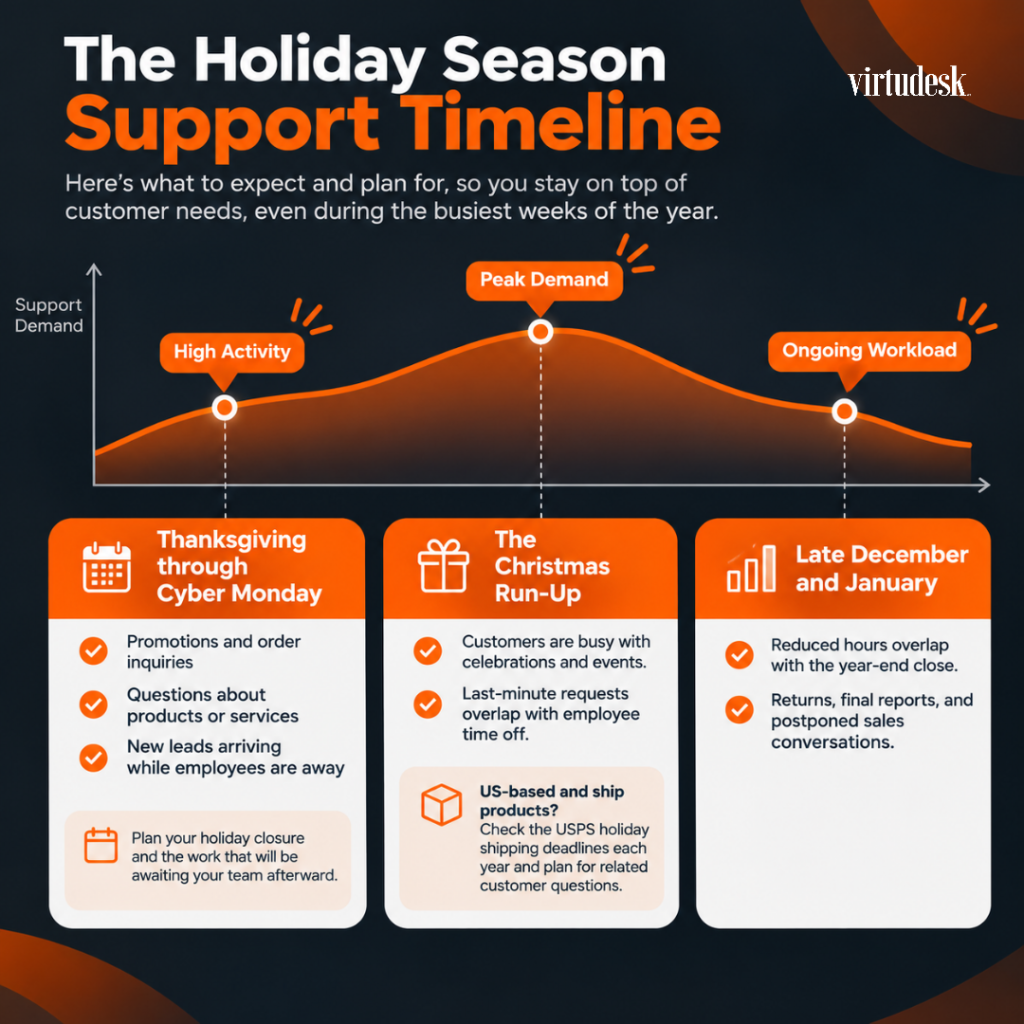
- Thanksgiving through Cyber Monday: Promotions, order inquiries, questions about products or services, and new leads arriving while employees are away. Plan the holiday closure and the work that will be awaiting your team afterward.
- The Christmas run-up: People are busy with celebrations and events, not to mention those who procrastinate. As a result, last-minute requests overlap with employee time off. If you are US-based and ship products, check the US Postal Service’s holiday shipping deadlines each year and plan for questions around them.
- Late December and January: Reduced hours overlap with the year-end close, followed by returns, final reports, and postponed sales conversations.
Check last year’s calendar, CRM, and inbox for delayed work. For your holiday season, plan your campaigns, closures, and approved time off thoroughly. And in advance.
How much extra support will you need?
- Don’t complicate yourself with complex calculations
Do a simple estimate. Multiply your expected weekly tasks by the minutes each one takes, divide by 60, and compare the result with the hours your team can spare.
Let’s say you expect 70 customer emails a week at six minutes each. That adds up to 420 minutes or seven hours. If your team can spare only three hours while people are out, you’re four hours short. And that’s without time for backlog updating, uncommon requests, corrections, coordination, or other tasks related to your operative.
- Distinguish work hours from coverage hours
Five hours of inbox work can be sorted out around a flexible schedule, but incoming calls all day can’t wait. Bear in mind both figures before choosing support. What are your business work hours? How many hours of work will you need covered?
- Create a shared coverage sheet with a row for each essential task
Record the date or shift, expected volume, primary person, backup contact, response target, and escalation route. Mark gaps before assigning new work. Use the same sheet for Thanksgiving, December absences, and the January handoff.
Prepare Your Business Before the Holiday Rush
If you will be understaffed, seek additional help. You could hire a VA for this busy period, but to get the best results, don’t neglect giving your virtual assistant for the holidays time to learn your business and systems, update records, schedule campaigns, and test workflows before the holiday rush knocks in.
When should you schedule holiday campaigns?
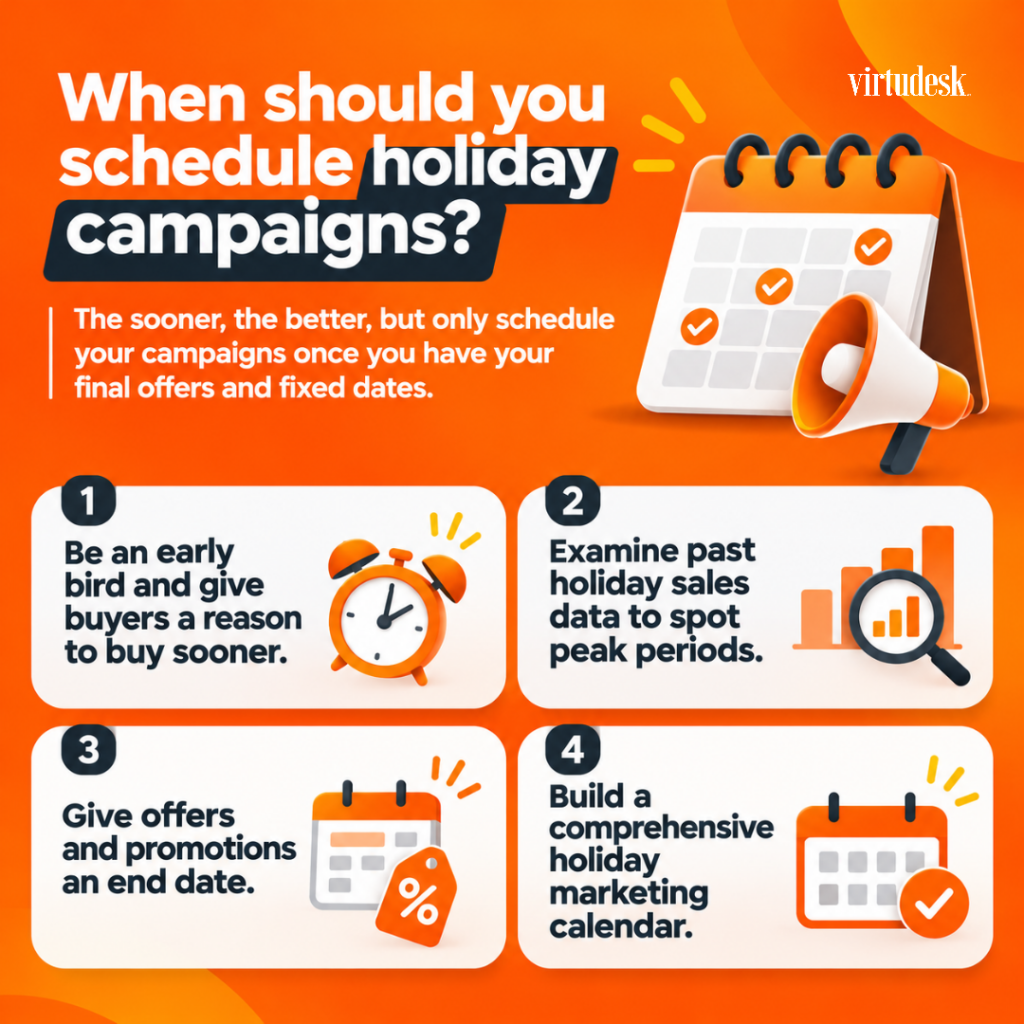
The sooner, the better, but only schedule your campaigns once you have your final offers and fixed dates. Not all small businesses plan to market the same way or at the same time. Are you planning to use new channels? Or to send new messages to your customers and target audience? Those take time too. Consider these simple tips:
- Be an early bird and give buyers a reason to buy sooner. Capture their attention before your competitors do. You can offer member-first access to events, or a special discount for early buyers.
- Examine past holiday sales data to spot peak periods. What worked for you? Which products or services had more demand? Which channels gave you the best results?
- Give offers and promotions an end date. If you are launching offers or promotions, end dates matter. An expired promotion that keeps running can create refund requests while you’re away.
- Build a comprehensive holiday marketing calendar. Ensure that it covers Thanksgiving, Black Friday, Cyber Monday, Hanukkah, Christmas, and New Year’s (and any others in between that may impact your business). Include key dates such as holidays, product launches, sales events and the deadlines for producing and publishing your content.
For a marketing VA, scheduling holiday campaigns is routine. They can draft emails and design social posts from your plan, load them into your scheduling tools, verify the dates and links, update your website and social media, reply to comments, and report on results.
It’s precisely during the holiday season that social media marketing needs utmost attention. It’s when people, potential clients, are out there evaluating their options. Curiously, social media management was our most requested task category from January through June 2026, at 18.9%. Now imagine how it rises during holiday campaigns.
Quick tip: Assign someone to approve changes if an offer sells out or a campaign needs to pause while you’re away.
Clean up your CRM
Every holiday email, callback, and report depends on the records behind it. Before the rush begins, your assistant can, for example:
- Merge duplicate contacts and correct outdated info
- Tag new customers, open quotes, and warm leads so each group gets the right message
- Add missing follow-up dates
- Process unsubscribe requests before campaigns go out
Note: The Federal Trade Commission’s CAN-SPAM guide says you must honor an opt-out request within 10 business days. You can ask for an optional short note on why they changed their mind and turn it into a learning opportunity.
Which customers should you contact before the holidays?
If you are closing during holidays, or working fewer hours, share your holiday hours, order or booking cutoffs, and the contact covering your absence.
First contact active clients, those with open orders, and leads awaiting a callback. Your assistant can build the list, send approved messages and log replies, or ask clients to confirm year-end deliverables in November to avoid urgent Christmas-week requests.
Organize calendars and workflows
A virtual assistant for the holidays can keep your calendar current, including approved time off, closures, deadlines, campaign launch dates, and the blocks you reserve for client work.
Look for the days or weeks with reduced staff.
Choose the tasks your VA will own and document the steps, tools, and expected results. Be realistic about your expectations and ensure the tasks you are delegating don’t overload them. Again, estimate the time for the work you want to delegate. Could one single person do it?
Whether it’s one or several VAs, you can either hire them through a business service provider, a placement agency, or hire directly. For direct hiring, our free client onboarding checklist will help you prepare the handoff.
Quick tip: Test workflows before Thanksgiving to spot missing access or unclear instructions.
During the Holidays: Keep Business Moving
It’s holiday season, but your business doesn’t take vacations. On the contrary. There are tasks that need to be done, yes or yes, to keep it moving forward. You need to cover customer inquiries, lead follow-ups, admin tasks, marketing, and appointments, with response targets and backups. A VA can help you with that. For broader task ideas, see how a VA keeps work moving over the holidays and our list of 10 ways a VA can help your business through the holidays.
Who answers customers when your team is away?
Customers may need an answer or a solution right while you and your team are having fun on Christmas Eve.
A customer service VA can answer customer inquiries through chat, email, or phone. If you receive phone calls quite frequently, we can help you with our call center services to support inbound calls and live chat.
Set a target response time for each channel. Prepare answers for the questions you can already predict: delivery dates, returns, and holiday hours, and how to proceed with unusual inquiries.
How do you keep leads from going cold in December?
Give your leads an owner and a response deadline. In a Forbes Business Council article on lead follow-up, Samuel Darwin recommends responding within five minutes. Set an achievable target and tell prospects when to expect a personal reply.
A sales prospecting VA, also called an inside sales agent, can handle holiday lead follow-up by responding to inquiries, making calls, and booking appointments. For high-volume outreach, Tymbl Dialer, our power dialer platform, supports reliable outbound calling and SMS.
Some prospects simply don’t buy in December. Log them with a January follow-up date, so the conversation resumes when they’re ready.
Administrative tasks and appointment scheduling
When one person is absent, small tasks can pile up incredibly fast. An assistant can sort the inbox, enter data, prepare invoices for your approval, and follow up with suppliers.
Imagine a home services company during Thanksgiving week, with its office coordinator away and limited technician availability. A VA can confirm approved booking slots, send reminders, and reschedule routine visits. Urgent requests follow the escalation process rather than entering the ordinary appointment queue.
Who Covers Thanksgiving and the Year-End Break?
Thanksgiving falls on November 26, 2026. Before that week, confirm closures and staffing, approve promotions, and test the handoff. After Cyber Monday, review delayed messages and missed follow-ups. Use those findings to adjust December hours, priorities, and training.
Make a separate coverage decision for Thanksgiving weekend and the week between Christmas and New Year’s.
A business may need normal service for one period and reduced hours for another. Choose among these arrangements:
- Close completely. Announce the dates and name a contact for urgent matters that require attention.
- Run reduced hours. Assign people to specific shifts and identify which requests or tasks can wait until full reopening.
- Keep normal service. Arrange enough staffing for the promised hours, and have a backup for essential responsibilities.
Our VAs at Virtudesk can work on any schedule you select. Request Thanksgiving, Christmas, New Year’s, and other needed holiday shifts in advance. Confirm availability before promising coverage to your customers.
Before you log off for the break, ask your VA to update your auto-replies, voicemail, Google Business Profile, and sort incoming messages by urgency. This means your first day back will start with a list instead of a pile.
To protect your time off, assigning inbox coverage and limiting escalations to agreed situations saves you from checking email or being reached out to for approvals.
After the Rush: Close December and Follow Through in January
Before December 31, organize available records, review open leads, and assign unfinished work. In January, your VA can help finalize reports and track returns or replies that arrived after year-end.
What should you organize before the year ends?
Start with your accountant, reports, and your January planning. Your VA can sort invoices and receipts, update customer and vendor records, add holiday purchases and inquiries to your database, and archive finished campaigns.
If you sell products, returns will continue coming in January. Tracking return status is something a VA can help you with.
Payroll preparation has deadlines. The IRS instructions for Forms W-2 generally require filing 2026 forms with the Social Security Administration and furnishing employee copies by February 1, 2027. Ask your VA to organize the requested records, and leave filing and tax decisions to your accountant or payroll provider.
Prepare year-end reports
Choose the reports that will help you make a decision. Your year-end reporting can include holiday sales by campaign, response times, open invoices, lead sources, and the questions customers asked most often.
Ask your VA to use consistent sources, flag missing figures, and label incomplete reports as preliminary. Compare matching date ranges with last year. Finalize the seasonal comparison once the period ends and remaining adjustments are recorded.
Follow up on leads before the new year
Sort open leads into three groups: ready to talk, asked to wait until January, and no longer interested. Your VA then sends the last messages of the year, books January calls, and updates your CRM.
How to Get the Most Out of Your Holiday VA Support
Besides their skills, your virtual assistant for the holidays needs access, hours, and instructions.
Set priorities
When several tasks arrive at once, your VA needs to know what goes first. Rank the work. Document that: urgent customer issues, new leads, scheduled campaigns, then routine admin, for example. Review that order weekly, since Cyber Week priorities won’t be the same in late December.
What should you document before the handoff?
Document every task your VA will repeat. You don’t need a long manual, just step-by-step processes. A short screen recording helps too. Each process should cover:
- The steps and tools involved, with access limited to what the task requires
- What triggers each task
- An example of a finished result
- Approved templates and answers
- Holiday hours, cutoff dates, and the right contact for each issue
If little is written down yet, ask your VA to help document the steps. Test the process together and confirm access before you leave.
Establish communication routines
Agree on a rhythm you can maintain. An end-of-day note can list completed work, overdue requests, and decisions needed from you. Name one channel for urgent issues. Check the oldest unanswered inquiry and unassigned leads at each review; if the backlog grows, move lower-priority work or arrange additional hours.
Timedly, our AI-powered time tracker, shows log-in times and attendance, and our dedicated VA plans include a team manager. Our management services offer that oversight for teams hired outside Virtudesk. Check those records alongside the finished work.
What should your VA escalate to you?
Escalate requests outside approved policies, decisions beyond the VA’s authority, unresolved complaints, and urgent risks. Routine billing questions, authorized refunds, and ordinary complaints can stay with the VA when their skills and training and written limits allow it. Define those limits before anyone takes time off.
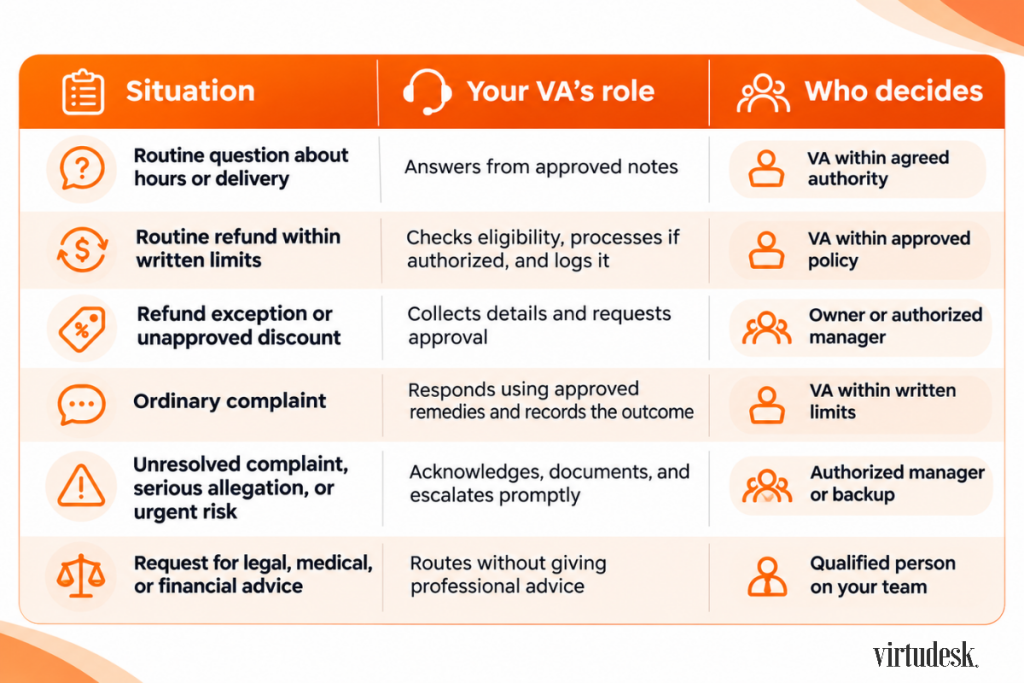
Name a primary decision-maker and backup for each escalation type. Set an acknowledgment deadline and explain when and how to contact the backup. If neither responds, specify an approved holding reply and safe next action.
Which Holiday Support Fits Your Business?
Before you choose a virtual assistant for the holidays, look at the work, the hours you need covered, and how long you’ll need help. You can combine virtual assistant services with other support, so several rows may apply to you.
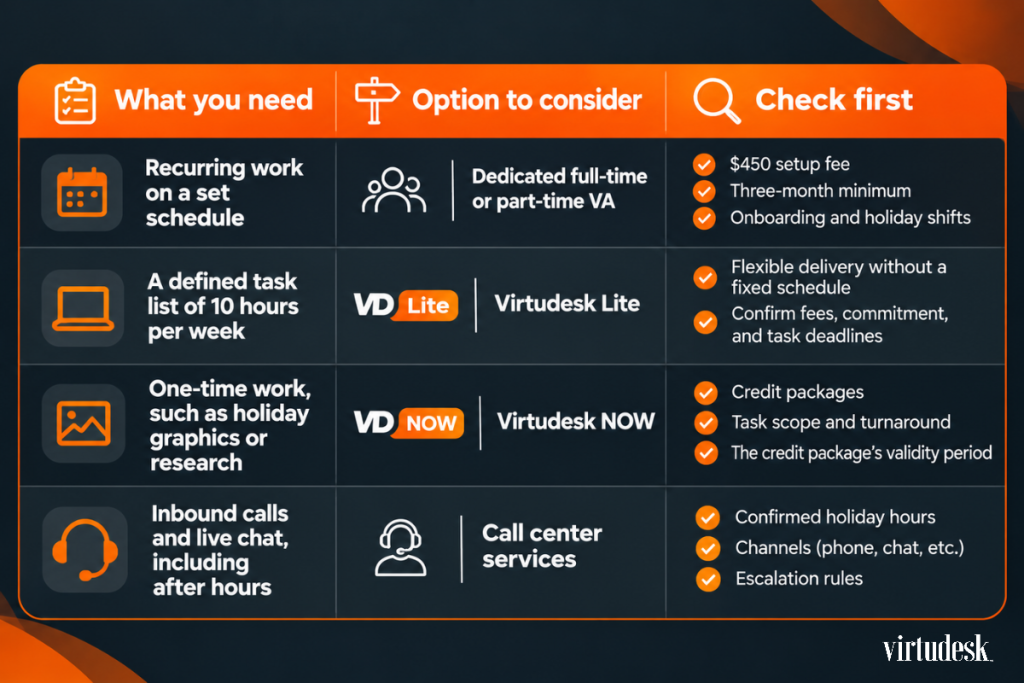
Confirm the terms for your selected plan, including Lite and Virtudesk NOW. Check current pricing and service details before you decide. And, of course, you can always scale from flexible or part-time coverage to a dedicated VA service.
Frequently Asked Questions
How far in advance should you hire a virtual assistant for the holidays?
If possible, several weeks before your first peak for selection, access, training, and a trial handoff. At Virtudesk, we select three to five candidates for you to interview and decide.
Can a virtual assistant cover Thanksgiving, Christmas, or New Year’s Day?
Yes, simply confirm availability and service terms in advance. Explain the dates and hours you need, then agree on shifts, responsibilities, and backups.
Is it too late to get holiday support once the season has started?
Not, but it’s not the ideal situation. Availability and start dates need confirmation and onboarding. If Thanksgiving has passed, use its backlog to set December priorities.
Can you keep your virtual assistant after the holidays?
Yes. CRM updates, lead follow-up, reporting, and customer support continue into January. Dedicated VA plans have a three-month minimum, so plan early-year responsibilities too. Review which tasks remain useful after the peak and adjust priorities.
Conclusion
The holiday season does not arrive as a single event. Thanksgiving sales, Christmas absences, and year-end deadlines each ask something different of your business. If you wait until your inbox overflows, you’ll have little time left to document the work or train anyone.
A virtual assistant for the holidays can help you put this plan into practice: prepare before Thanksgiving, maintain agreed coverage during December absences, and complete the follow-through in January. As a full business service provider, Virtudesk offers VA support, call center services, and management services to address different parts of that work.
Plan your holiday coverage now, while you still have time to hand the work over properly.
Schedule a free discovery call and tell us which dates and tasks concern you most. Prefer to talk? Call us at +1 (800) 470-8136.
Share this article
Recent Posts
Meet our Most Trusted
Partners & Clients

Byron Lazine
Co-Founding Chief-of-Operations at BAM (Broke Agent Media)I’ve been using Virtual Assistants for years throughout all of my companies. Once we found Virtudesk the process got even easier and allowed us to scale out our hiring. Highly skilled and accountable professionals. 100% recommend!

Rebecca Guy
Realtor / Content CreatorBefore getting started with Virtudesk I had my doubts that they would find what I was looking for. I needed a very particular person to add to my team and let me tell you I am highly pleased! My virtual assistant Myril is the best! I am excited to grow my socialmedia accounts with her. Thank you Virtudesk!

Chelsea Erickson
Realtor La Belle RE GroupI am very happy with the assistance Virtudesk is providing for my real estate business. This is a newer position for my company and we are working through the creation and efficiency.


