
Your Q3 Business Review: Do You Need More People or Better Support?




Your third fiscal quarter (Q3) review should answer two questions:
Do you need more support? If so, what kind of support?
First, identify the work that needs attention and determine the support it requires. In that order, your Q4 business preparation will have a basis, instead of being disorganized guesswork.
Every business will need a different solution. Some need an in-house employee; others a specialized virtual assistant (VA), customer support, or sales support; some may need to scale up to a whole virtual team. Other businesses should start by fixing their internal processes instead. In many cases, these options should work together, such as a manager and a VA, or short-term help while recruiting for a permanent position.
After Q3, you have nine months of data to work with. This data shows what is working, what keeps falling behind, and what needs to be changed. In this guide, we’ll see how to read that data, that evidence, and match each need to the right type of support.
Key Takeaways
- A Q3 business review should ideally reveal what causes work delays and how those delays affect your business.
- First of all, detect where the problem is. Is it insufficient hours, under-skilled staff, insufficient coverage, or an unclear process? Each needs a different solution.
- You can size the shortfall easily. Multiply weekly volume by minutes per task and compare that result with the hours your team can spare.
- When evaluating internal hiring vs remote support, compare their total costs and setup requirements. Both need preparation and business-specific guidance, although it may be at different levels.
- One VA may take care of numerous responsibilities related to the role. But if the workload, skills, or coverage exceed what one person can provide, consider redistributing responsibilities or adding support.
- Define your Q4 goals, then choose support against those goals. You’ll then assess whether the added capacity improves results and reduces the work bouncing back to you.
Look at Your Current Workload
Your workload review exposes where your tasks are getting stuck, and it tells you more than the number of hours your team logs. Review the last 90 days and watch for backlogs, bottlenecks that cause delays, and tasks that keep bouncing back to your desk.
Then compare your findings with last year’s Q4, forthcoming campaigns, client commitments, and programmed time off. Year-end is different for every business and many times even for every team within a business. You may experience a massive holiday rush, a quieter sales period, or fewer available working days.
When building your Q4 business preparation, be realistic about the demand you expect.
Spot where work is falling behind
Think of business bottlenecks as traffic jams where what stops moving is work. Usually, you’ll notice the same delay week after week. Search for patterns. Look through your inbox, CRM, calendar, and task manager to identify:
- Requests that consistently take longer to answer than your promised response time
- Proposals, invoices, or reports that keep going out late
- Leads that never got a follow-up call
- Approvals that are on hold because only one person has the authority to give them
- Customer questions that are passed around among team members until someone finally decides to step in and answer
Add missed opportunities to this list too. Look back at lost leads, unanswered inquiries, and referrals that never got a callback. If you can’t establish the financial damage, record the missed action without making up a random revenue number.
For every delay that keeps showing up, ask yourself a simple question: Is someone actively working on this right now, or is it just waiting for information, approval, or someone to pick it up? The answers help you clarify if you’re dealing with a real staffing shortage or if there’s a problem in your process.
Separate routine tasks from work that needs your involvement
Sort each recurring task into one of three buckets:
- Work that strictly needs you: Tasks that need your authority, relationships, or high-level decision-making
- Delegable tasks: Work a skilled team member could handle if given clear instructions and defined boundaries on what they can decide
- Obsolete work: Tasks that no longer serve a purpose, don’t add value anymore and can be dropped

The middle group becomes your delegation list. It frequently covers administrative tasks like scheduling, data entry, CRM updates, follow-up calls, or drafting routine reports. It can also include work that requires some level of judgment, as long as the person has the right skills and knows when to flag something that requires your approval.
Is your team already overloaded? (a must-check)
Overload doesn’t come with an alert notice, so you have to watch for subtle signs:
- Constant overtime
- Unused vacation days
- Declining work accuracy
- A single team member holding core processes entirely in their head
Employees who suffer recurrent burnout are 2.6 times more likely to leave their current employer, as Gallup’s findings indicate. For nonexempt employees, overtime inflates payroll costs under federal overtime rules. And losing a skilled employee before peak season can derail your busiest weeks.
Ask your staff which tasks are competing for their attention. A crowded calendar alone doesn’t tell you if they need extra hands, clearer priorities, or simply fewer interruptions.
Figure out if the issue is people or process
A lot of capacity issues are process problems in disguise. So, before hiring someone (on-site or remotely), make sure the work has a clear owner, written steps, and the right tools. Without them, a new person will inherit the same confusion. Look out for these red flags:
- Different people do the same task in totally different ways.
- Work stalls while someone waits for your approval.
- Your team members ask you the same questions week after week.
- Nobody can say who owns a recurring task.
When you see these red flags everywhere, address the process before you start sizing up an additional role. Our mid-year business check walks through that review in more detail. But if your process is sound and work still keeps piling up, it’s time to investigate. What’s missing: more hours, specific skills, or better coverage?
Estimate how much additional capacity you need
To make an initial estimate, you don’t need a complicated staffing model. It takes just a few steps:
- List the recurring work.
- Note the expected weekly volume.
- Calculate the average minutes it takes to complete it.
- Multiply the volume by minutes per task, divide by 60, and add the results to estimate hours per week.
- Then compare that total with the hours your team can spare after taking their existing commitments into account.
For instance, suppose you expect 60 routine requests a week. At, hypothetically, around 12 minutes per request, that adds up to 12 hours of work. If your current team can allocate seven hours, you are looking at an initial shortfall of five hours a week.
Now, double-check what the estimate leaves out: tricky exceptions, team coordination, fixing errors, and clearing the current backlog. If task times fluctuate, use a range instead of a single number.
Also look at when work comes in. You can finish your five hours of weekly admin tasks all on Friday; that’s completely different from incoming calls you need to answer throughout the day right when they arrive. Total hours and coverage are separate questions, different problems to address.
Do You Need Another In-House Employee?
Adding another in-house employee sounds appropriate when your business needs an ongoing internal role, particularly if you need physical presence or continuing decision authority. But a full-time traditional hire also brings recurrent costs, commitment, and a long and costly recruitment process.
When a full-time internal role makes sense
A traditional internal hire may be your best move if:
- The work has to, unavoidably, be done on-site: Things like handling equipment, operating machinery, or providing face-to-face client service.
- The position manages a full in-house department: Roles that bring overall accountability for team results or require presenting its work or results to clients.
- You need ongoing internal authority: The job involves direct control over sensitive strategic or financial decisions.
- Compliance forbids external support: Client contracts, data privacy rules, or access requirements rule out delegating work to an external contractor.
- You already have enough ongoing full-time work: The workload justifies a permanent role and matches your longer-term plans.
A single non-negotiable on-site requirement can make the decision for you. Conversely, just because you have enough work to justify a full-time role doesn’t mean you automatically need an in-house employee. A dedicated virtual assistant could handle that workload as well. Ask yourself what genuinely requires an internal hire and what supporting work could be handed off somewhere else.
What a new hire really costs
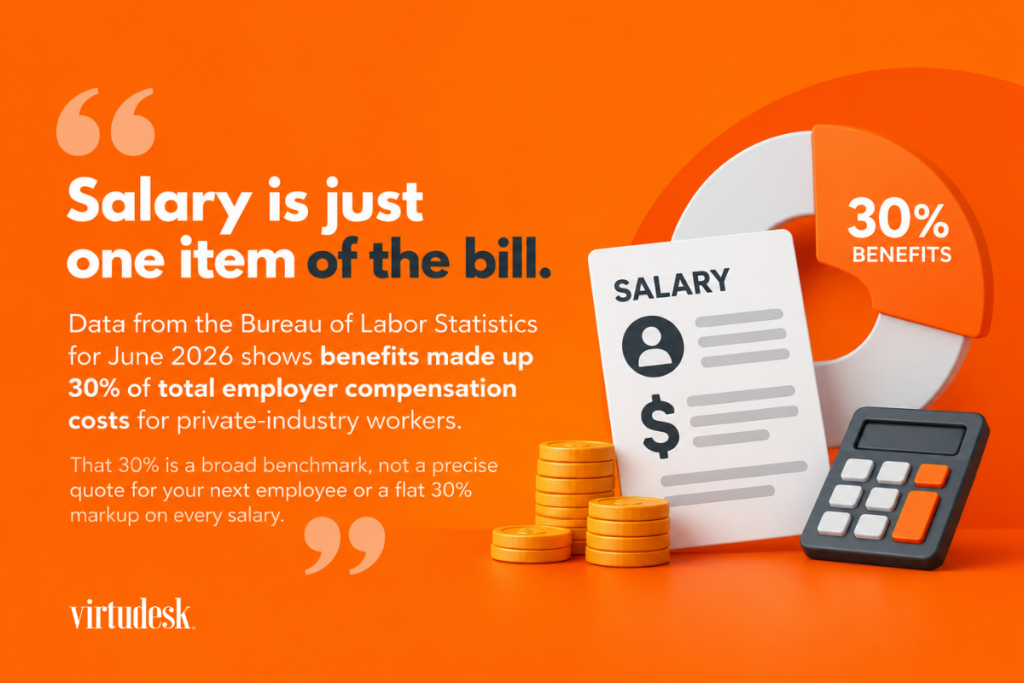
Salary is just one item of the bill. Data from the Bureau of Labor Statistics for June 2026 shows benefits made up 30% of total employer compensation costs for private-industry workers. That 30% is a broad benchmark, not a precise quote for your next employee or a flat 30% markup on every salary.
There are other factors that add to your final costs: recruiting, equipment, software licenses, training, and other requirements that are specific to your industry. Now, compare your estimated total with the remote-hiring option. Depending on the service provider, this may include setup fees, minimum commitments, management, and any tools that may be charged separately.
Take a look at our virtual assistant pricing lists. We offer full-time, part-time, and Virtudesk Lite (a flexible, service-based solution that covers 10 weekly hours of VA support). All of these options include a dedicated manager and reporting support. Before considering any dedicated arrangement as temporary seasonal help, review the applicable setup fee and commitment period. Confirm how schedule changes or reductions would work after Q4 wraps up.
Allow time for recruitment and useful early work
Recruiting takes longer than most Q4 plans allow. According to SHRM data, the median time to fill a nonexecutive position is 39 calendar days. Take this as a planning reference, not a deadline you’ll meet.
Once you hire, the next step is onboarding, which takes time. Gallup reports that it usually takes a new hire a year or more to get fully up to speed in their role. But a new employee doesn’t need to master every responsibility to be useful and contribute to your business. Identify the work the person could reasonably take on early on and who is going to train them.
If you really need a permanent position, start recruiting. Meanwhile, you can arrange support for administrative or other tasks you need to delegate. You don’t have to solve a backlog and a long-term need with one staffing choice.
Would a Specialized VA Be a Better Fit?
If you need specific skills or extra capacity but not another in-house employee, a specialized virtual assistant can be the best solution. The work should be suitable for remote delivery, with clear expected outcomes, appropriate access, and an agreed way to review results.
What if specific skills matter more than headcount?
Sometimes what you need is expertise instead of more support hours. For example, a real estate broker may need transaction coordination; medical practices may need insurance verification and patient scheduling; or a law firm may need client intake and deadline tracking.
We provide virtual assistant services for a wide range of business functions. When discussing a specialist role, clearly describe the tasks and experience you need. Familiarity with an industry helps, but you’ll still need to explain your procedures, approval rules, and client expectations.
Draw a clear line between what’s support and what are professional decisions. For example, organizing intake information for a new client is a different job than advising them about a legal matter.
When you need additional recurring capacity
Your team may have the know-how for the work but lack the hours. Adding a dedicated VA is a reliable option to delegate recurring tasks on a schedule that works for you, and the capacity estimate you calculated earlier from your review gives you a starting point for picking the appropriate service plan.
Before committing, confirm candidate availability, relevant experience, the proposed start date, and how much time you’ll need for onboarding. Finding remote support isn’t plug-and-play. As a business owner or manager, you still need to give clear instructions, system access, and feedback. Include that preparation in your Q4 business preparation, particularly if you already feel overloaded.
When the work is a project, not a role
Some Q4 work ends when the project ends. A presentation, a set of holiday graphics, or updates to existing website content may not justify an ongoing assistant.
If you need support just for a project or a few tasks, Virtudesk NOW is a suitable solution. You can get your tasks done without hiring a dedicated virtual assistant. You simply buy one-time credit packages and submit tasks to a managed team without a subscription. We confirm the credits the tasks consume and the expected turnaround before work begins. Delivery time depends on the task and receipt of the necessary materials or access.
Use project-based support for a defined deliverable. Consider dedicated support when you need someone consistently available for recurring responsibilities.
Do You Need Administrative or Customer/Sales Support?
Administrative, customer, and sales support describe the type of work you need covered. These are work categories that can include varied tasks. Any of them might involve one generalist VA, a specialist, or several people. Unsure where to start? Then focus on the function where additional help would solve your biggest and most costly delay.
Administrative functions you can hand off
Administrative work is what keeps the business organized and running smoothly. And much of it can be easily done remotely. Typical tasks you can offload include:
- Calendar management and appointment booking
- Sorting your inbox and answering routine emails
- CRM updates and data entry
- Assisting with invoices, tracking expenses, and pulling weekly reports
- Formatting documents and following up with vendors
Watch for one signal in particular: if you or your managers are spending your evenings catching up on these tasks, it may be time to delegate them into a dedicated support role. Just make sure to keep high-level decisions such as payment approvals or special exceptions in the hands of someone specifically authorized to make them.
Customer support before volume peaks
Take a look at when customer inquiries arrive and spike.
Review how long your customers or prospects are currently waiting for a response and which questions or issues keep being escalated. The problem may be the sheer volume of inquiries, gaps in coverage, or a slow approval process. Each requires a different fix.
Check if your phone customer support can handle the demand.
If you need phone support and your current team can’t handle more volume, an inbound call center service is a solid option.
Evaluate your customer support channels.
If you also need help with your email responses, outbound callbacks, or account-specific work, discuss those requirements upfront to ensure the proposed service plan covers them.
Set realistic target response times suited to your business and define urgent situations.
A maintenance emergency shouldn’t be sitting in the same queue as a routine request. Finally, decide who handles escalations and who covers breaks or absences.
Sales and prospecting support
Sales support helps your team act on the leads it already generates. To stay on track, leads need prompt follow-up, accurate CRM records, and steady outreach. According to Salesforce's 2026 State of Sales, an average seller spends 40% of their working time selling. This doesn’t mean all remaining non-selling tasks can be delegated, but it gives you a good reason to examine where your team's time goes.
Prospecting VAs, also called inside sales agents, can help with list building, booking appointments, and making follow-up calls. For high-volume outbound calls, a tool like Tymbl Dialer provides power dialing and the capability of sending and receiving SMS. It’s undeniable that tools help, but the technology only supports the process; you still need to define your target audience, follow-up process, and what qualifies as a valuable appointment.
When Hiring a Broader Remote Support Team Makes Sense
Hiring a team is reasonable when the workload, must-have skill sets, or coverage hours are too much for one person to handle. One single VA could do multiple tasks only if those responsibilities fit the person's abilities and available working hours.
Signs one VA is no longer enough
Look at your Q3 review and see if:
- Although your VA works at full capacity, the backlog keeps growing.
- Your operations or customers need coverage that exceeds your VA’s schedule.
- Specialist tasks or projects interrupt indispensable daily administrative work.
- One person taking a sick day or going on vacation leaves critical operations work without a backup.
- Two urgent tasks need attention at the same time, like answering customer calls while pulling detailed reports.
When you spot a bottleneck, investigate it. Sometimes, just adding more hours solves a volume spike. Other times, trying to balance live phone support alongside specialist work means you do need two separate people in those roles. In case you’re relying on cross-coverage, you have to design it intentionally since adding a second person doesn’t automatically create a dependable backup system.
Example: scaling from one VA to a coordinated team
Imagine a property management firm with 15 employees and one general VA. Q3 is coming to an end and tenants are waiting up to two days for a callback while maintenance requests accumulate in a shared inbox. The VA spends most afternoons on the owners’ financial statements while tenants remain waiting for assistance.
So, the owner checks whether the VA has a clear, documented process for handling and escalating requests. If they do, then the core issue is almost certainly a capacity one. Can one person realistically manage incoming calls and comprehensive financial reports simultaneously?
How can the company fix this? Simply splitting the workload:
- A customer service VA to answer tenant calls and manage maintenance intake
- An administrative VA to process owner statements and handle lease renewal paperwork
- The business owner to keep control over exceptions and financial decisions
For the kickoff, the owner can set a target, such as returning routine calls within three business hours, and then evaluate if that’s doable given the current staffing and incoming demand. From that point, tracking metrics like turnaround times and statement accuracy will show whether the fix is working.
Keep roles and results clear and visible
Every position needs a designated owner, a backup, defined deliverables, and an escalation contact. Plus, someone has to be responsible for sorting out competing priorities and checking work quality.
With monitoring and time tracking software like Timedly, our proprietary AI-powered tracker, you have visibility into hours, attendance, and tasks. Use those logs alongside your verified results. After all, logged hours per se won’t tell you if an invoice was accurate or a customer’s problem was actually resolved.
If you need oversight support, our dedicated VA packages include a dedicated team manager. We also offer management services for teams hired outside Virtudesk.
Make the Right Q4 Decision
Thorough Q4 business preparation involves weighing your workload, business objectives, budget, and growth plans together. Choosing the cheapest support option may leave your main bottleneck unresolved, while a larger commitment may exceed what the work requires.
Weigh workload, goals, budget, and growth plans
For each factor, ask yourself one question:
- Workload: Is this gap a constant issue, a seasonal spike, or tied to a particular project?
- Business goals: Which Q4 target does this gap put at risk?
- Budget: What kind of investments can you make without straining cash flow after year-end?
- Growth plans: Will this work still exist next year? Will it grow?
Be precise about your goals; simply saying “getting more help” does not define a result.
Match each capacity gap to a support model
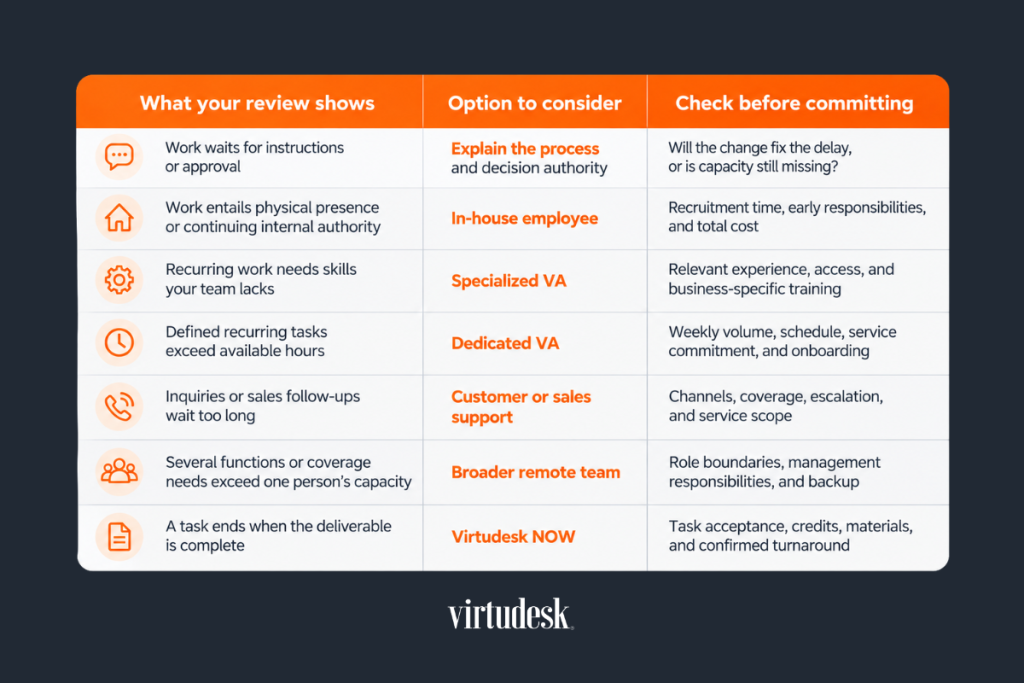
The table below helps you narrow your options. Several rows may apply to your business.
Decide what can start now and what needs more time
If your team can already cover the projected workload, you don’t need to increase your staff. Think about what would trigger another review, such as a continuous rise in overdue work.
Begin with the date you’ll need extra help, then decide when to start hiring and onboarding. Assign time to set up system access, train the person, and review their first assignments. If you don’t have much time, give them fewer tasks to start with, or hire short-term support while you recruit for a permanent role.
Before you finish the review, write down four key things:
- The gap you need to fill
- How you plan to do it
- Who prepares the handoff
- The first review date
Log a baseline, like current response times or backlog numbers, so you have a basis to gauge progress later on. Include your own coordination and correction time. If completed work increases but you are still spending hours checking it, look at quality, instructions, or role fit before expanding your team.
Frequently Asked Questions
Does Q4 business preparation always require more people?
The fact that Q4 is approaching doesn’t mean you need to add staff. If the workload you expect fits your team's available time and skills, adding personnel isn’t the answer. To evaluate this, consider also planned absences, possible unplanned ones, backup arrangements, and any habitual delays. Document what would trigger another review of your decision, for example, continuous growth in overdue work.
Is it too late to add support once Q4 starts?
You can always add support during Q4. In that case, begin with a group of non-complex tasks, tasks you can explain and review in the time you have left. It will be easier to delegate a documented admin workflow or a defined project than a wider role. If you need a permanent hire, continue recruiting while arranging short-term support for the immediate work.
How do I avoid paying for support I won’t need in January?
Before picking a service, separate recurrent responsibilities from temporary work. Estimate what will remain after the seasonal peak. Consider project-based support for work with a clear termination and think of a dedicated VA for continuing responsibilities. Confirm the terms with the service provider; don’t take for granted that every remote option allows abrupt reductions.
Conclusion
Your Q3 review should reveal where work is falling behind and what would make it move forward. Different solutions could apply to your business: improving your processes, hiring an in-house employee, a specialized VA, or a managed remote team. Or perhaps a combination of them.
If your findings show you need more support, strong Q4 business preparation will include choosing the kind of support that fits your operations, starting while you still have time to hand the work over, and then verifying whether the arrangement brings the improvement you expected.
At Virtudesk, we help you find, train, and support the remote talent your business needs. Our virtual assistant services, call center services, and management services could solve your operating issues. For concrete, one-time tasks, Virtudesk NOW provides managed help without a subscription.
Schedule a free discovery call or call us at 1 (800) 470-8136. Tell us about your Q3 review results: which work needs attention, and when you need support. We will help you find the most suitable service and plan the next steps.
Share this article
Meet our Most Trusted
Partners & Clients

Byron Lazine
Co-Founding Chief-of-Operations at BAM (Broke Agent Media)I’ve been using Virtual Assistants for years throughout all of my companies. Once we found Virtudesk the process got even easier and allowed us to scale out our hiring. Highly skilled and accountable professionals. 100% recommend!

Rebecca Guy
Realtor / Content CreatorBefore getting started with Virtudesk I had my doubts that they would find what I was looking for. I needed a very particular person to add to my team and let me tell you I am highly pleased! My virtual assistant Myril is the best! I am excited to grow my socialmedia accounts with her. Thank you Virtudesk!

Chelsea Erickson
Realtor La Belle RE GroupI am very happy with the assistance Virtudesk is providing for my real estate business. This is a newer position for my company and we are working through the creation and efficiency.


